Summer Blooms: A Practical Guide to Original Vector Floral Assets
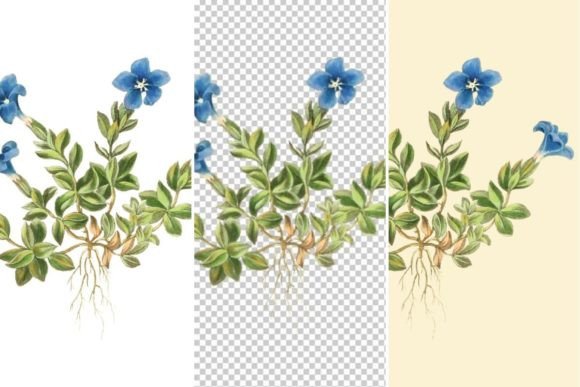
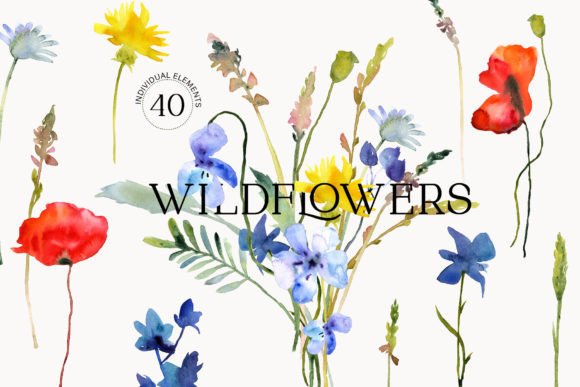
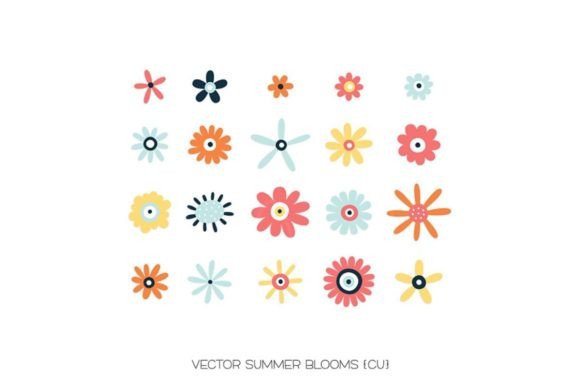
When the creative calendar turns toward warmer months, designers and crafters alike begin searching for visual elements that capture the vibrancy of the season. Summer Blooms addresses this specific need as a curated collection of 20 original vector images drawn in Adobe Illustrator. Unlike generic stock photography or raster-based clip art, this set provides scalable, editable artwork designed for versatility across digital and physical mediums. Understanding the technical composition and practical applications of this asset library is essential for creators looking to maximize their return on investment and streamline their summer-themed production workflows.
The Technical Advantage of Vector-Based Floral Design
To fully appreciate the utility of Summer Blooms, one must first understand the distinction between vector graphics and standard raster images. Because these 20 illustrations were originally drawn in Illustrator, they are defined by mathematical paths rather than fixed pixels. This fundamental characteristic dictates how the assets can be manipulated and applied in professional environments.
Scalability Without Quality Loss
The primary benefit of using Summer Blooms in vector format (.AI and .EPS) is infinite scalability. A designer working on a small wedding invitation can use the same floral element for a massive venue backdrop or trade show banner without experiencing pixelation or blurriness. For business owners producing merchandise ranging from enamel pins to duvet covers, this flexibility eliminates the need to purchase separate assets for different size requirements. The lines remain crisp and the colors stay solid regardless of the output dimensions.
Editability and Customization
Original vector files allow for deep customization that pre-rendered images cannot offer. Within Adobe Illustrator or compatible software like Affinity Designer, users can modify individual anchor points, adjust stroke weights, and recolor specific petals or leaves to match exact brand palettes. If a project requires a specific shade of coral that differs from the original artwork, the change can be made globally in seconds. This level of control ensures that Summer Blooms serves as a foundational template rather than a rigid, unchangeable graphic.
Navigating File Formats for Specific Workflows
The inclusion of multiple file types—.AI, .EPS, .PNG, layered .PSD, and .TIF—is not merely a feature list; it represents compatibility with distinct creative ecosystems. Selecting the correct format is crucial for maintaining quality and efficiency.
- .AI (Adobe Illustrator): The native source file. Essential for designers who need to alter the geometry of the flowers, combine elements into new patterns, or prepare files for professional print separation.
- .EPS (Encapsulated PostScript): The industry-standard exchange format. Use this when collaborating with clients or printers who may use older versions of Illustrator or alternative vector software like CorelDRAW. It preserves editability while ensuring broader compatibility.
- Layered .PSD (Photoshop Document): Critical for digital artists and photo manipulators. The layer structure allows users to isolate specific blooms, apply blending modes, add texture overlays, or integrate the flowers into complex photo composites without destructive editing.
- .PNG (Portable Network Graphics): Pre-rendered with transparent backgrounds. These are optimized for quick placement in Canva, Microsoft Word, or web design platforms where vector editing is unavailable. They serve as "drag-and-drop" solutions for non-designers.
- .TIF (Tagged Image File Format): A high-resolution, lossless raster format. Ideal for archival purposes or high-end art printing where maximum color depth and detail are required, but vector editing is not necessary.
Applications in Sublimation and Textile Printing
One of the most significant use cases for Summer Blooms lies in the sublimation and fabric printing sectors. Sublimation requires high-saturation artwork that can withstand heat transfer processes without losing definition. Because these vectors are created with clean paths and solid color fills, they translate exceptionally well to polyester substrates.
Crafters creating custom apparel, tote bags, or tumblers will find that the bold lines of Summer Blooms prevent the "washed out" look often associated with low-resolution florals. Furthermore, the ability to create seamless repeating patterns from the individual vector elements adds substantial value. Instead of being limited to single placements, users can tile the 20 unique blooms to generate yardage for quilting, dressmaking, or home decor upholstery. The layered PSD files also facilitate color correction specifically for CMYK printer profiles, ensuring that the vibrant summer hues seen on screen match the final physical product.
Paper Crafts, Scrapbooking, and Physical Media
While digital applications are prominent, the tactile nature of paper crafts demands specific asset qualities. For scrapbookers and card makers, Summer Blooms offers a balance of artistic detail and print readiness. The high-resolution PNG and TIF files ensure that even when printed on textured cardstock or matte photo paper, the intricate details of the botanical illustrations remain sharp.
In the context of scrapbooking, the transparency of the PNG files allows for effortless layering over patterned papers or photographs. Users can create dimensional effects by printing duplicate copies of a bloom, cutting out specific petals, and using foam tape to raise them above the base layer. This technique mimics the depth of hand-painted illustrations without requiring advanced painting skills. For stationery designers, the vector formats enable the creation of coordinated suites—matching thank-you cards, envelope liners, and belly bands—all derived from the same consistent visual language.
Evaluating Suitability for Commercial Projects
For business owners and freelancers, integrating Summer Blooms into commercial products requires an understanding of both aesthetic fit and licensing implications. From a design perspective, the style of the collection should align with the target demographic. These illustrations carry a fresh, organic aesthetic suitable for wellness brands, summer sales events, garden centers, and seasonal retail packaging. However, they may be less appropriate for industrial B2B marketing or dark, moody luxury branding unless significantly modified.
Professionals should also consider the time-saving aspect of original vector sets. Creating 20 cohesive, high-quality floral illustrations from scratch can take dozens of hours. By utilizing Summer Blooms, agencies and solo entrepreneurs can redirect that time toward layout design, marketing strategy, or client communication. The consistency of the set also solves a common design problem: mismatched styles. When sourcing free assets from various websites, achieving visual harmony is difficult. With a unified set, every element shares the same line weight, shading technique, and color theory, resulting in a polished, professional final product.
Practical Considerations and Limitations
While versatile, no asset library is without limitations. Users should approach Summer Blooms with realistic expectations regarding software requirements and learning curves.
- Software Dependency: To unlock the full potential of the .AI and .EPS files, access to vector editing software is mandatory. Users relying solely on basic image viewers or word processors will be limited to the static PNG versions, negating the primary benefits of scalability and editability.
- Color Space Awareness: Vectors are often created in RGB color space for screen vibrancy. Creators intending to use Summer Blooms for offset printing or sublimation must convert files to CMYK and perform soft-proofing to anticipate color shifts. Neon or overly saturated screen colors may dull during physical reproduction.
- Style Saturation: As with any popular asset pack, there is a possibility of seeing similar designs across the marketplace. Professionals seeking exclusivity should plan to modify the vectors significantly—altering compositions, adding unique textures, or combining elements with proprietary typography—to distinguish their work from others using the same base assets.
- File Management: Managing five different formats for 20 individual assets results in 100 files. Implementing a robust digital asset management system early prevents workflow bottlenecks. Organizing files by format or intended use case (e.g., "Print Ready" vs. "Web Quick") saves valuable time during active projects.
Maximizing Creative ROI
Ultimately, the value of Summer Blooms extends beyond the initial acquisition. It functions as a modular design system rather than a static picture pack. By leveraging the interoperability of the included formats, creators can maintain a consistent summer theme across diverse touchpoints—from Instagram stories and email newsletters to product packaging and event signage.
For those new to vector graphics, this set serves as an excellent educational tool. Deconstructing the .AI files reveals professional techniques in path construction, gradient application, and layer organization. For seasoned veterans, it provides reliable, high-quality raw material that accelerates production cycles. Whether used for a personal scrapbooking weekend or a large-scale commercial textile launch, Summer Blooms offers the technical foundation necessary to bring warm-weather visions to life with precision and artistic integrity.